nf-core/epigenomesegmentation
An nf-core pipeline for epigenome segmentation using EpiSegMix/Meth — a hidden Markov model with flexible read count distributions and state duration modeling for histone, open chromatin, and methylation signals.
Introduction
nf-core/epigenomesegmentation is a bioinformatics pipeline for chromatin segmentation. It uses a hidden Markov model (HMM) to annotate genomic regions with functional states (e.g., enhancers, promoters) based on combinations of epigenetic modifications, capturing spatial relations via transition probabilities.

This is an approved de.NBI service. Please help us improve by taking our short user survey (https://de.surveymonkey.com/r/denbi-service?sc=hd-hub&tool=esmm).
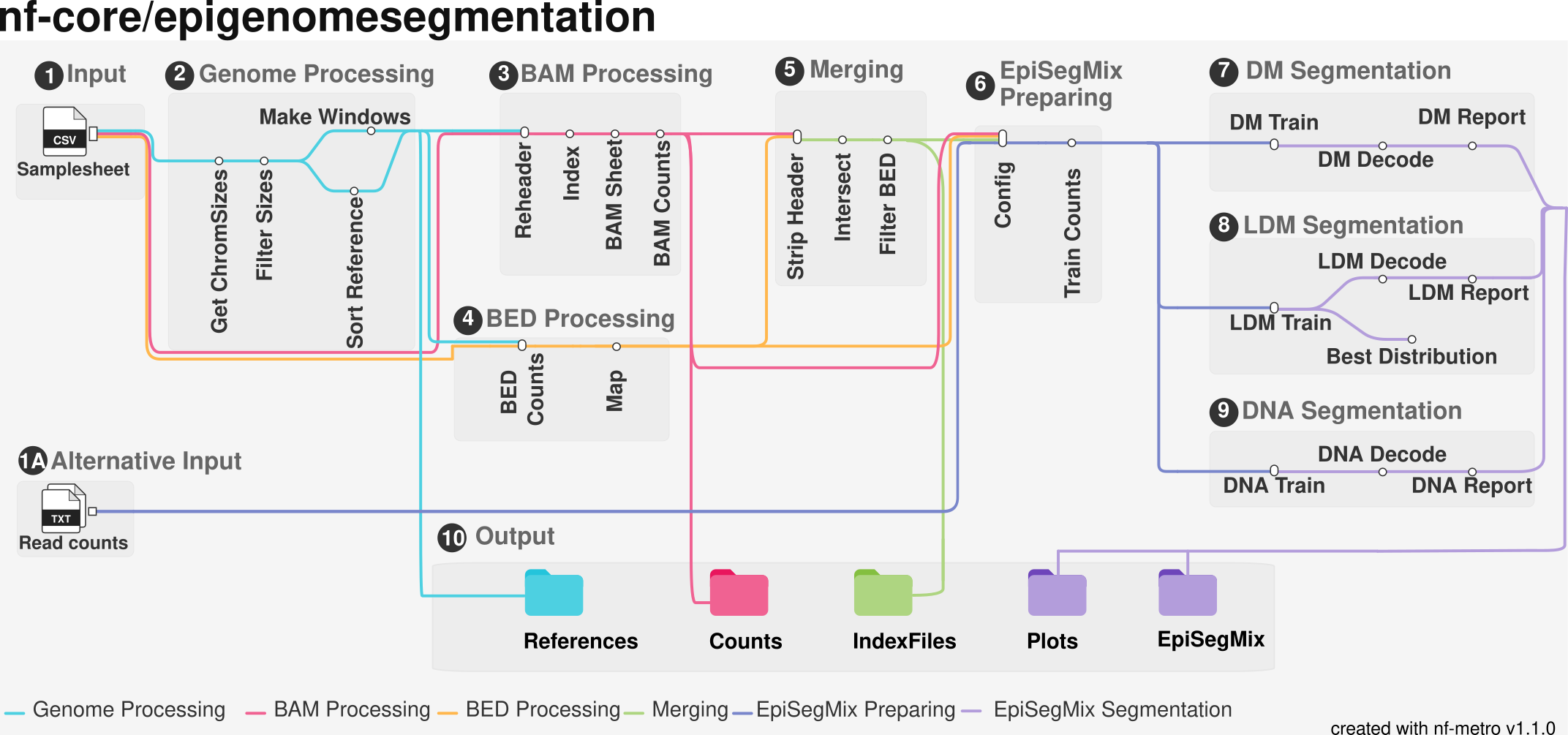
Default Workflow: Topology Modelling
By default, the pipeline runs the topology-modeling (LDM) segmentation workflow. Use --duration to select the duration-modeling (DM) workflow, --dna for methylation/coverage-only segmentation, or --fitting to evaluate candidate count distributions instead of running the usual segmentation workflow. --jointrain is an optional shared-training mode and is disabled by default.
Execution Steps
-
Genome Processing: It includes 4 modules (
GET_CHROMSIZES,FILTER_CHROMSIZES,SORT_REFRENCE&MAKE_WINDOWS) to generate a binned window size reference BED file based on parameter--binsize and --genome(200 and hg38 by default) along with a sorted reference chromosome sizes tab file. -
BAM Processing: It includes 4 modules (
SAMTOOLS_REHEADER,SAMTOOLS_INDEX,BAM_SHEET&BAM_COUNTS) to generate a count matrix for histone marks using BAM files as input for the tool EpiSegMix. -
BED Processing: It includes 2 modules (
BED_COUTNS&BEDTOOLS_MAP) to generate a count matrix for coverage markers using BED files as input for the tool EpiSegMix. -
Merging: It includes 4 modules (
STRIPHEADER,BEDTOOLS_INTERSECT,FILTER_BED&JOINBED) to standardize the files to have the same number of rows and same genomic positions between histone and coverage counts is also responsible for merging the different coverage counts files together in one file. -
EpiSegMix Prepare: It includes 2 modules (
CONFIG&TRAINCOUNTS) These generate a config file along with the training counts for the tool EpiSegMix. -
EpiSegMix Topology Modelling: It includes 3 modules (
TRAIN,DECODE&REPORT) to give us segmentation results based on topology modeling HMM. -
EpiSegMix Standard Modelling: It includes 3 modules (
TRAIN,DECODE&REPORT) to give us segmentation results based on standard modeling HMM. -
EpiSegMix Methylation Modelling: It includes 3 modules (
TRAIN,DECODE&REPORT) to give us segmentation results based on topology modeling HMM but only for coverage markers. -
EpiSegMix Fitting: It includes 2 modules (
TRAIN&BEST_DISTRIBUTION) to give us a new samplesheet containing the best distribution that fits our data.
Subworkflow Reference
The pipeline logic is organized into the following modular components:
| Category | Subworkflows |
|---|---|
| Setup | GET_CHROMSIZES, FILTER_CHROMSIZES, SORT_REFRENCE, MAKE_WINDOWS, CONFIG & TRAINCOUNTS |
| Data Processing | SAMTOOLS_REHEADER, SAMTOOLS_INDEX, BAM_SHEET, BAM_COUNTS, BED_COUTNS & BEDTOOLS_MAP |
| Modeling | TRAIN, DECODE & REPORT |
| Optimization | BEST_DISTRIBUTION |
Note: Use
--countsto generate and publish count files without training a model or creating segmentations. See the usage documentation for details.
Note: Precomputed count matrices can be supplied with --methcounts and/or --histonecounts; see the usage documentation for their requirements.
Usage
If you are new to Nextflow and nf-core, please refer to this page on how to set-up Nextflow. Make sure to test your setup with -profile test before running the workflow on actual data.
First, prepare a samplesheet with your input data that looks as follows:
samplesheet.csv:
sample_id,replicate,epigenetic_mark,file_name,modality,paired_end,distributionKidney,1,H3K27ac,../data/kidney/histone/kidney_H3K27ac.bam,ChIP-seq,true,NBIKidney,2,WGBS,../data/kidney/wgbs/kidney_WGBS.bed,WGBS,true,BIEach row represents a specific assay file associated with a sample. The pipeline automatically distinguishes between histone data and methylation data based on the file extension.
Column Specifications
sample_id: A unique identifier for your sample (e.g.,Kidney). Files sharing the samesample_idwill be grouped and processed together.replicate: The replicate number for the sample (e.g.,1).epigenetic_mark: The specific target or assay type (e.g.,H3K27acfor histones,WGBSfor methylation).file_name: The file path. Histone data must be.bamor.bam.gz. Methylation data must be.bedor.bed.gz.modality: The type of experiment performed (e.g.,ChIP-seq,WGBS).paired_end: A boolean value (trueorfalse) indicating if the sequencing data is paired-end.distribution: The statistical distribution to apply during model training for this mark (e.g.,NBIfor Negative Binomial,BIfor Binomial). Leave empty to use global defaults.
Now, you can run the pipeline using:
nextflow run nf-core/epigenomesegmentation \ --input samplesheet.csv \ --outdir <OUTDIR> \ --genome hg38 \ -profile <docker/singularity/.../institute>Please provide pipeline parameters via the CLI or Nextflow -params-file option. Custom config files including those provided by the -c Nextflow option can be used to provide any configuration except for parameters; see docs.
For more details and further functionality, please refer to the usage documentation and the parameter documentation.
Pipeline output
To see the results of an example test run with a full size dataset refer to the results tab on the nf-core website pipeline page. For more details about the output files and reports, please refer to the output documentation.
Credits
The original framework EpiSegMix that was used in ESM (https://doi.org/10.1093/bioinformatics/btae178) and ESMM (https://doi.org/10.1101/2025.07.25.666820) was written by Johanna Elena Schmitz and Nihit Aggarwal (Saarland University).
The pipeline was rewritten in Nextflow DSL2 by Aaryan Jaitly (Saarland University).
EpiSegMix tool was developed and designed by:
- Nihit Aggarwal
- Johanna Elena Schmitz
- Dr. AbdulRahman Salhab
- Prof. Dr. Jörn Walter
- Prof. Dr. Sven Rahmann
Contributions and Support
If you would like to contribute to this pipeline, please see the contributing guidelines.
For further information or help, don’t hesitate to get in touch on the Slack #epigenomesegmentation channel (you can join with this invite).
Citations
An extensive list of references for the tools used by the pipeline can be found in the CITATIONS.md file.
You can cite the nf-core publication as follows:
The nf-core framework for community-curated bioinformatics pipelines.
Philip Ewels, Alexander Peltzer, Sven Fillinger, Harshil Patel, Johannes Alneberg, Andreas Wilm, Maxime Ulysse Garcia, Paolo Di Tommaso & Sven Nahnsen.
Nat Biotechnol. 2020 Feb 13. doi: 10.1038/s41587-020-0439-x.